
External Document Signing & Guest Signatures
Send someone outside your organisation a link to sign a document. Review the evidence recorded with their signature. The setup affects what is recorded, and legal validity is not guaranteed.
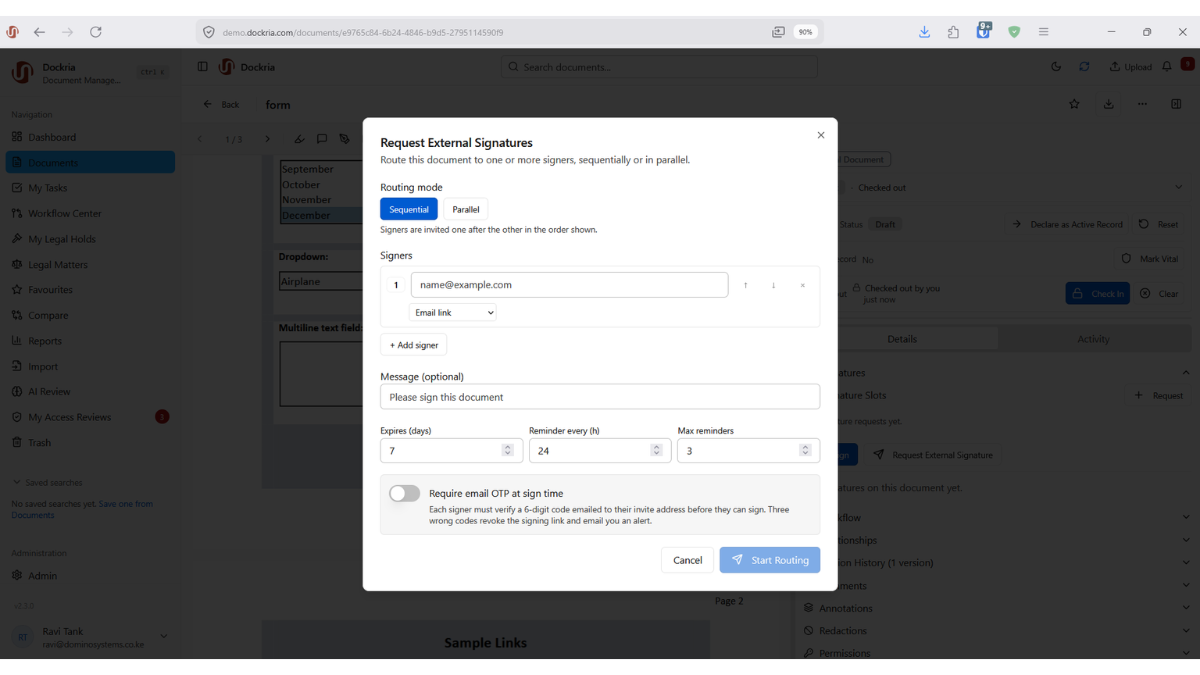
Existing interface image for orientation only. Framework names, status labels and signature stamps do not establish certification, legal conformity or a tested deployment. Use the qualified feature descriptions below.
How it works and what to check
Most documents that need signing involve someone outside your walls: a client, a vendor, a counterparty, a member of the public. Forcing them to create an account just to sign adds friction that delays deals and frustrates everyone. Dockria's External Signing removes that barrier entirely.
Requesting an external signature is as simple as right-clicking a document and entering the recipient's email address. They receive a unique, secure link that opens a branded signing page showing the full document preview, no account, no login, no software to install. They can scroll through every page before signing.
Recipients can draw or type a signature, or apply an evidence stamp without a personal mark. They place it on the page or in defined signature fields. A stamp records context, not compliance certification.
Requests depend on permissions, signing rules, authentication and configured message delivery. Evidence stamps and available audit records support review of the signing context; they do not establish independent identity certification, complete audit coverage or every item of evidence required in a dispute.
The supplied October 2026 product assessment reports external signing implementation, not an independently executed runtime verification. Dockria does not issue Qualified electronic signatures on its own. Self-issued seals and OTP evidence do not by themselves establish legal Advanced or Qualified status. Assess the document's governing law and execution formalities before use.
Key Benefits
No Account Required
Recipients sign on a branded page with no login or software to install, removing the friction that delays agreements.
Secure Unique Links
Each signing request is delivered as a unique, secure link tied to that specific document and recipient.
Branded Signing Page
The signing experience carries your organisation's branding, reinforcing trust with clients and counterparties.
Flexible Signing Modes
Signers can draw, type, or apply an evidence stamp, and place it freely or onto defined signature fields.
Evidence Stamp
Inspect recorded signing context. A stamp is not a compliance certificate or independent identity certification.
Available Audit Evidence
Review recorded activity alongside other evidence required for the transaction; complete coverage and legal outcomes are not guaranteed.
Industry Use Cases
Request signatures on suitable client documents after checking execution and witnessing requirements.
Collect external signing evidence subject to required identity checks and regulatory formalities.
Request signatures on permitted forms after confirming agency rules and authentication requirements.
Collect signatures on permitted administrative documents; a recorded signature alone does not establish informed clinical consent.
Related Features
See How This Feature Applies to Your Industry
Ready to see external signing in action?
Schedule a personalised demo and discover how Dockria can transform your document management operations.
Request a Demo